Re-animating the 2D Skeletal Animation Space
Where it All Began
Having played Flash games in the 2010s, I was accustomed to the style and charm of characters being rig-animated rather than the usual frame-by-frame. Being your average programmer who could just barely draw up something passable, I wanted to make rigs and take advantage of procedural animation (characters looking at any angle, inverse kinematics, etc). This was apparently a big ask, as every opportunity came with some major caveat.
Let’s start with a bit of context; I primarily want to make my games using libraries. These tend to be very simple frameworks, so much so that they don’t have any visual editor to lay things out. This is fine as most visual work like level design, textures, etc. is done in separate programs. Skeletal animation is no different, but the ecosystem isn’t as bright.
Illusion of Choice
The 1st option would be DragonBones - it’s the most competent while being fully free. It’s got inverse kinematics and mesh deformation; you’d say it’s a steal if they weren’t outright giving it away! Unfortunately no one’s there to give it out anymore. Scroll down to the bottom of the barely-working site and you’ll see this:

Even with other signs of life taken into consideration (eg; the Twitter account made in 2020), it’s clear that DragonBones isn’t being maintained anymore. You know what is maintained, however? The subscription-based, web-only, AI-centric animator known as LoongBones! How’s that for a juxtaposition?
I would say ’the 2nd option would be…’ but the rest of the animators have the same issue with minor deviations, so I’m lumping all of them in.
Besides DragonBones, the other ‘obvious’ choice is Spine. It’s the ultimate animator, and I know it is because it costs almost three times my monthly rent!

The Essential version is still a whopping $80. No, it’s not worth it just because the full version is so prohibitively overpriced. The Essential version doesn’t even include meshes, which you could at least get in game engines like Godot or Unity.
Speaking of those engines… why not pick them? As mentioned previously, I much prefer the workflow of simpler frameworks. It’s not speculation either - Unity was my first foray into gamedev and I’ve outgrown it ever since, and even then the skeletal animation workflow is surprisingly not as intuitive as you’d hope.
Other options like Creature and Spriter have similar price issues as Spine. It’s on a smaller scale, but I’m still not paying that much for something I don’t even know will be good to use when the honeymoon phase of a game’s development is over and it’s time to start actually making things work.
With all this in mind, I was willing to ignore DragonBones’ issues and try it out anyway - it’s fine. The UI is confusing and I didn’t get far with my own characters, but that’s because I spent most of my time on the runtime. Being acquainted with the runtime development process gave me a very bright idea:
What if I just… made my own thing?
The 15th Standard
Now hold on - before you go ‘oh boy, here’s another for the pile, ’ hear me out.
DragonBones has more issues than simple abandonment. The editor itself isn’t open-source, and there’s no runtime documentation or specification (reading source code of existing runtimes doesn’t count). While people like me could make said docs, there’s nothing stopping the editor’s inevitable bit rot. Even if it were open-sourced, the problem might be shifted to ‘it’s a Flash program’ with all the SWFs and JSFLs I can see within the executable folder.
If it wasn’t clear by now, I’m not doing all of this just for myself - I want to see animations like these beyond just from my own games, and no amount of effort on my end will offset the constant decline of an aging editor. Ideally it would be something that at least has a chance of being carried forward if it’s ever abandoned by its original devs (in this case, me). With all this being said, I would like to introduce my solution:
SkelForm - A free and open-source 2D skeletal animator for games.
Skeletal Animation for Everyone*
That’s the tagline I’m building SkelForm (Skeletal Formation) on - it’s a bit cringy, but it helps to keep in mind that SkelForm should ideally be suited for both newcomers and veterans of animation software.
Let’s get the easy points out of the way; it’s free, not just as in free beer but open-source. It’s on Windows, Mac, Linux, and… web! This is big not just because installation isn’t required, but it also provides a fallback if downloaded versions don’t support any particular platform (eg; FreeBSD, mobile, etc).
Let’s briefly go over what else SkelForm has (so far):
A Friendly UI
As mentioned previously, DragonBones’ UI is confusing. It attempts to copy Spine’s UI (which I’m also not a fan of) with an over-use of icons and no singular source for where properties can be edited:
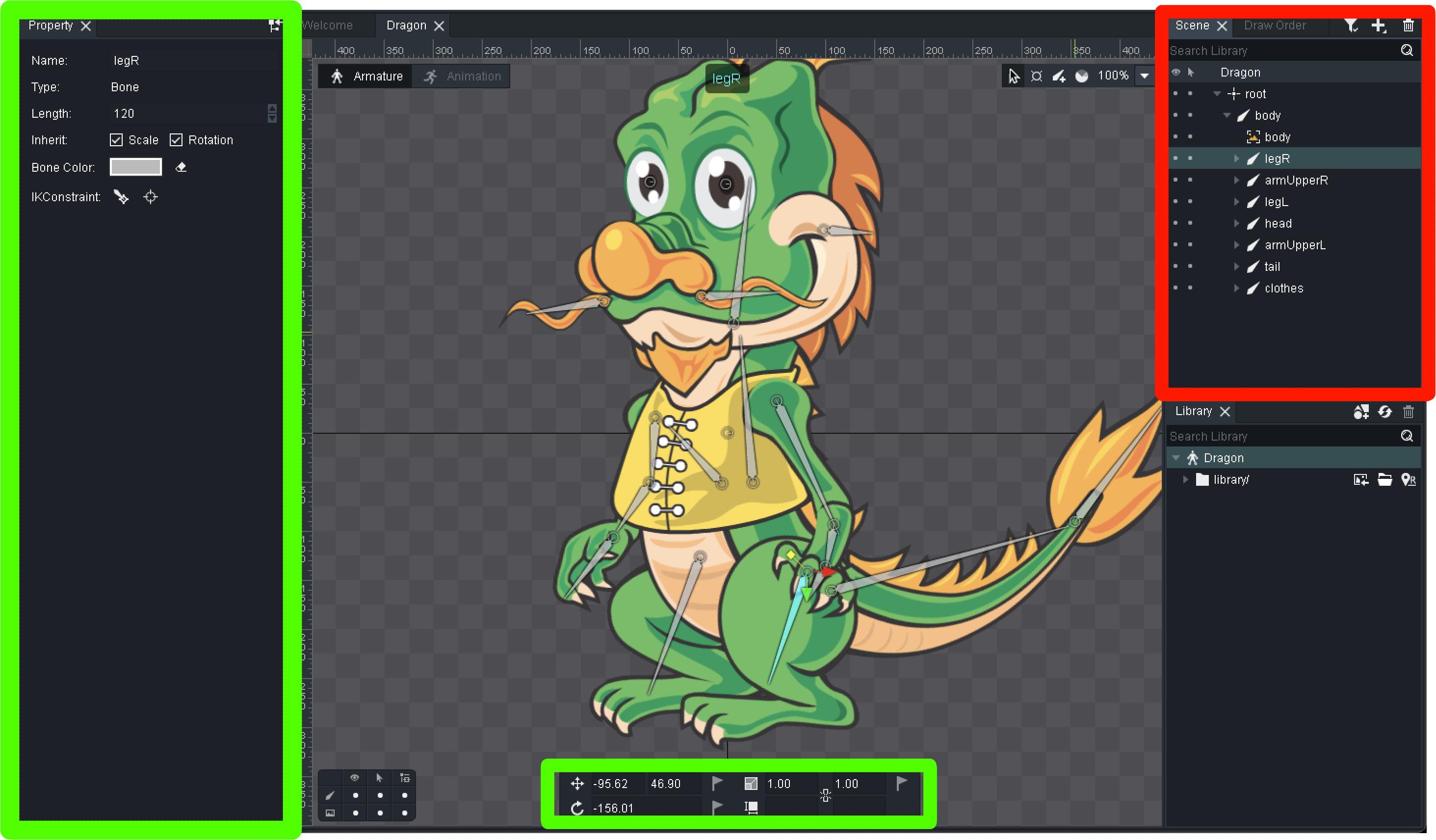
This layout has never made sense and I’ve never gotten used to it. What makes far more sense is Godot/Unity’s design, which puts every editable property in 1 place:
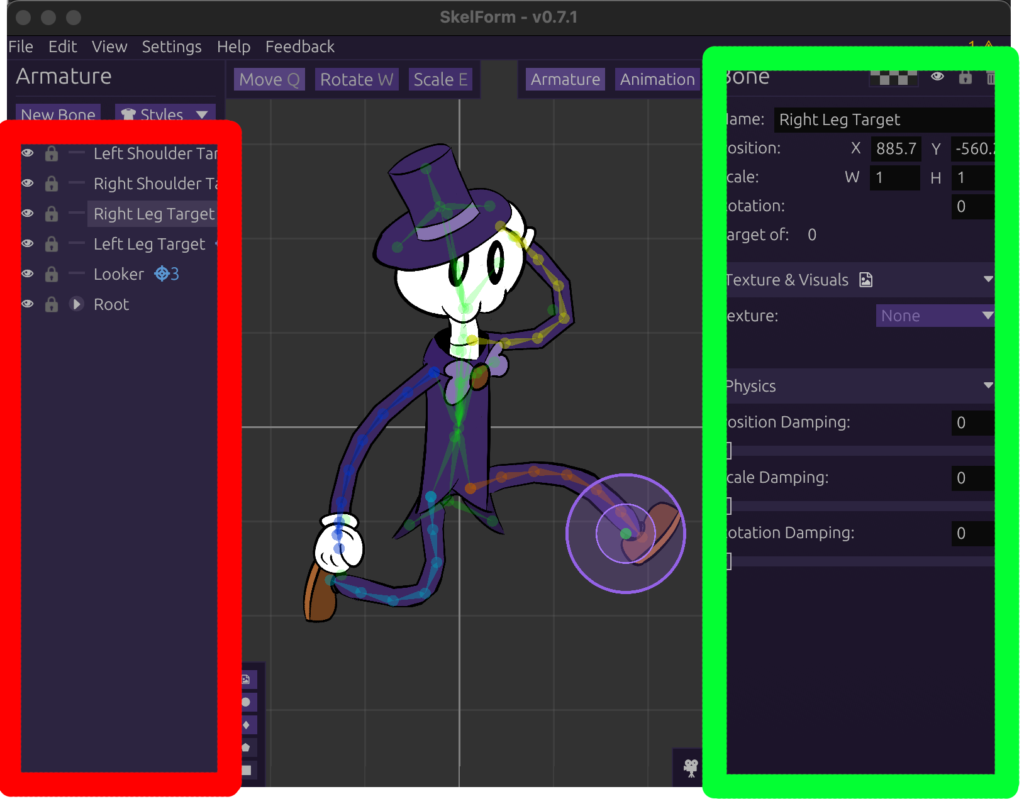
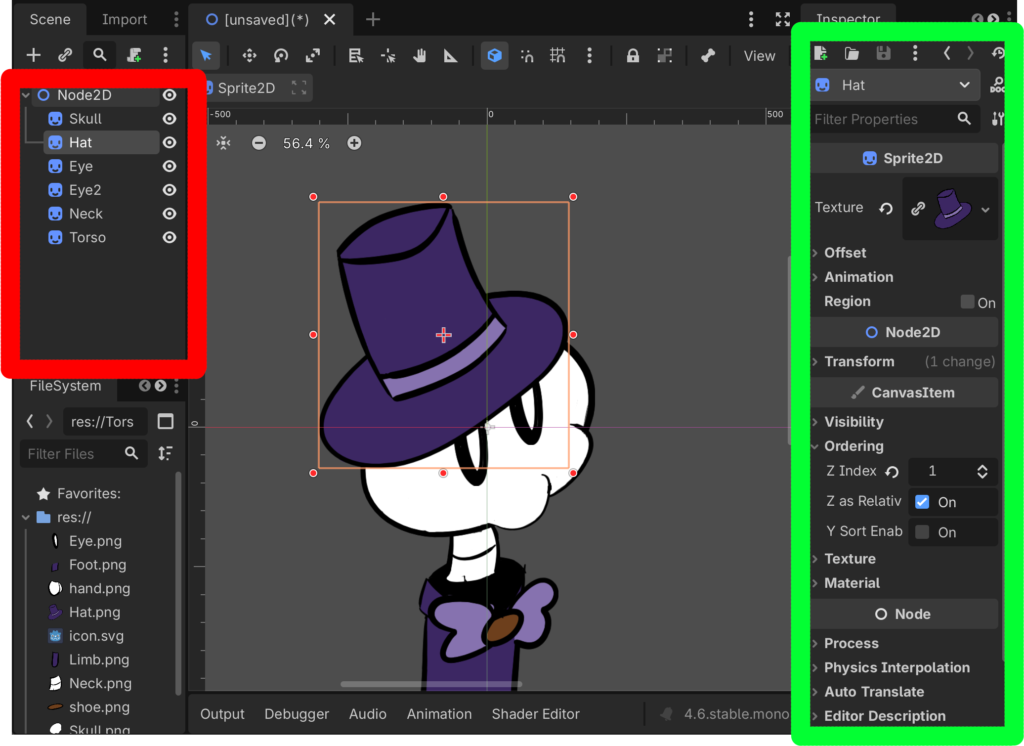
Certain properties like position, rotation, etc. can be edited by other means, but their numerical values (which are the most important) are on the right side like everything else. For a program whose only purpose is animating, it shouldn’t be any more complicated than that.
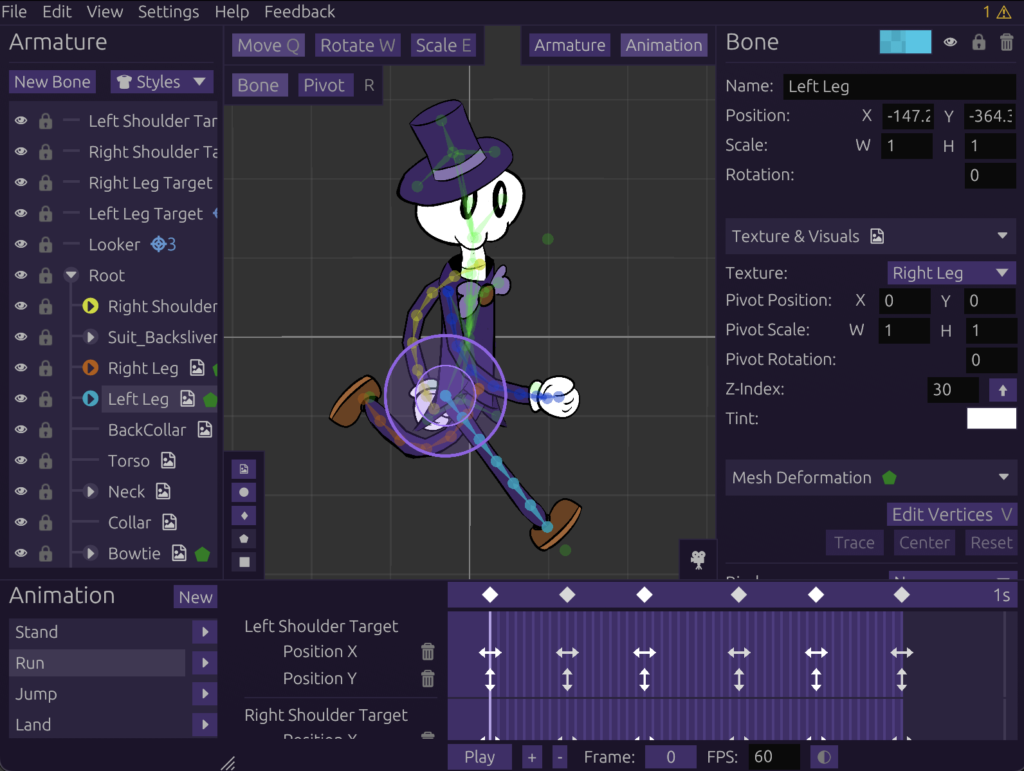
Managing the UI will only get harder as more features are added, but I think it’s fine in spite of all the features that SkelForm currently has to offer. After all, it shouldn’t be a lot.
Lots of Features
A skeletal animator isn’t complete until it has inverse kinematics and mesh deformation. Even if most of your rigs don’t use it, the potential of procedural animation and faster workflows can’t be overstated.
These features will have their own posts when the time comes, so have this rapid-fire list for now:
- Inverse Kinematics w/ constraints (clockwise/counter-clockwise)
- Mesh deformation with binds, weights, and pathing
- Styles - mix-and-match texture system for skins/outfits
- Procedural physics via damping, swaying, bouncing
The above is just for runtime features - the editor alone can import and convert PSD files into working armatures (provided that the right structure is used), as well as exporting to armature, spritesheets, and video.
As a developer it may seem daunting to see all of those runtime features and be expected to implement them. Don’t worry, the ‘Everybody’ in the earlier tagline includes you.
*Developers Included
Besides the User Documentation which contains help for using the editor (as well as using complete runtimes), there’s a separate Developer Documentation that is entirely dedicated to creating runtimes from scratch. While it’s not super detailed and still missing a lot of explanations, it contains commented Typescript examples for every single implementation.
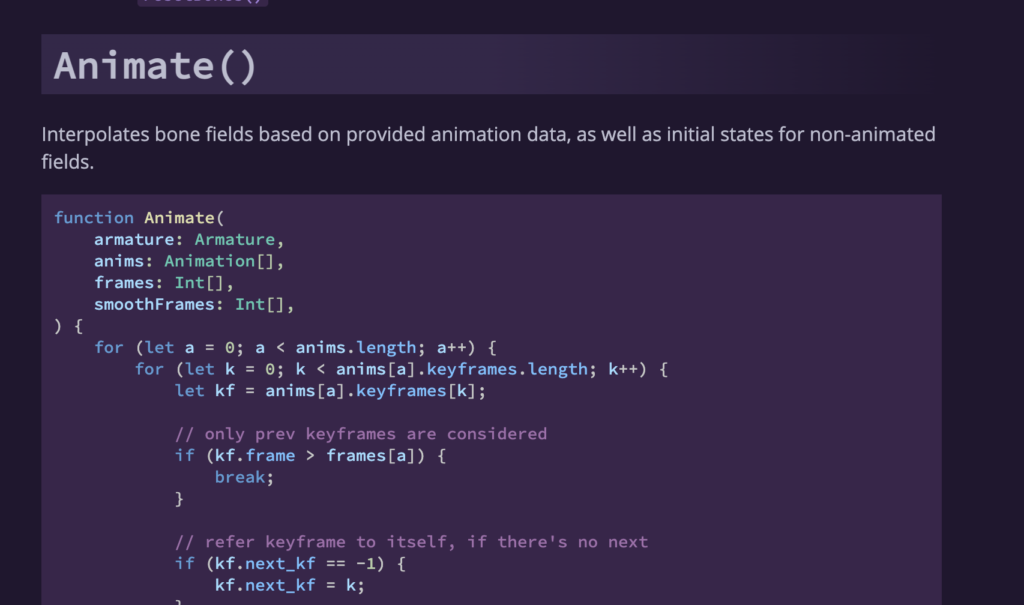
Although it’s hard to market this as a selling point, being as friendly and transparent about every part of the runtime specification and implementation is core not just for others to integrate SkelForm, but also to hold it accountable and ensure its complexity doesn’t get out of control. If a feature is missing in SkelForm, it’s most likely because I haven’t yet figured out a practical implementation that’s easily documentable.
To prove that all this documentation actually works, I’ve created not 1, not 2, but 8 different runtimes (4 generic and 4 engine)!
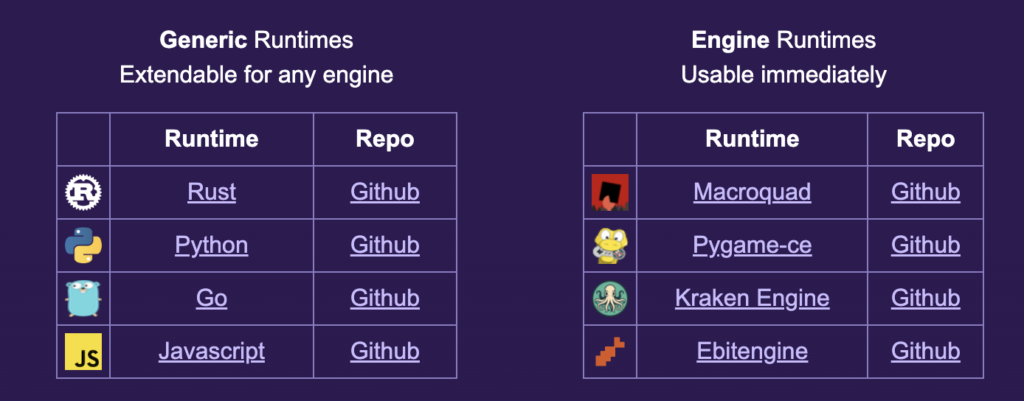
You may be wondering why there isn’t a Javascript game engine despite having a Javascript runtime. That one was created for the web player, which appears just below the web editor on the site:
It works just like any other runtime, and can be used to add SkelForm animations to your own sites. :)
Rant Over
That’ll be all for my villain origin story. What started as an innocent attempt to make a game with quirky animations led to a year-long (and counting) project to bring it to the masses. Yes, it sounds ambitious and a bit delusional, but I wouldn’t have gone as far as I have if I didn’t believe in it.
If you’ve read up to this point, thank you. I would appreciate if you gave SkelForm a try and let me know what you think (forums, itch, reddit, etc). Video tutorials are available in the official YT channel if you’re ever lost.
Other aspects of SkelForm will be expanded in greater detail in future blogposts. Until then, see you next time!