How To Read This
This is a developer-focused document for developing SkelForm runtimes.
This document is written under the assumption that a general-use runtime will be made and accounts for all features and cases, but need not be followed this way for personal runtimes.
Runtime APIs
Both generic and runtime sections are based on their public-facing API functions.
The functions within their sections need not be implemented, and simply exist to split their respective algorithms to be more easily digestible.
Example
All general-use generic runtimes must have an Animate() function that works as
intended (interpolates bones & resets them if needed).
The Animate() function’s implementation is covered in its own section, and the
functions within do not need to be public nor even implemented. All that matters
is Animate() working as intended.
Pseudo Code
All code shown on this document is not meant to be run directly.
The language used is Typescript, but with a few concessions:
numberis replaced withintorfloatwhere appropriate
File Structure
The editor exports a unique .skf file, which can be unzipped to reveal:
armature.json- Armature data (bones, animations, etc)atlasX.png- Texture atlas(es), starting from 0editor.json- Editor-only datathumbnail.png- Armature preview imagereadme.md- Little note for runtime devs
This section will only cover the content in armature.json.
Table of Contents
armature.json
| Key | Type | Default | Description |
|---|---|---|---|
| version | string | "" | Editor version that exported this file |
| ik_root_ids | int[] | [] | ID of every inverse kinematics root bone |
| baked_ik | bool | false | Was this file exported with baked IK frames? |
| img_format | string | "PNG" | Exported atlas image format (PNG, JPG, etc) |
| clear_color | Color1 | (0, 0, 0, 0) | Exported clear color of atlas images |
| bones | Bone[] | [] | Array of all bones |
| animations | Animation[] | [] | Array of all animations |
| atlases | Atlas[] | [] | Array of all atlases |
| styles | Style[] | [] | Array of all styles |
Bones
| Key | Type | Default | Description |
|---|---|---|---|
| id | uint | 0 | Bone ID |
| name | string | "" | Name of bone |
| pos | Vec2 | (0, 0) | Position of bone |
| rot | float | 0 | Rotation of bone |
| scale | Vec2 | (1, 1) | Scale of bone |
| parent_id | int | -1 | Bone parent ID (-1 if none) |
| tex | string | "" | Name of texture to use |
| zindex | int | 0 | Z-index of bone (higher index renders above lower) |
| hidden | bool | false | Whether this bone is hidden |
| tint | Color1 | (255, 255, 255, 255) | Color tint |
Initial Fields
During animation, armature bones need to be modified directly for smoothing to
work.
If a bone field is not being animated, it needs to go back to its initial state
with initial fields (starting with init_).
bool fields use int initial fields, as animations cannot store boolean
values (but can still represent them as 0 and 1)
The following is not an exhaustive list.
| Key | Type | Default |
|---|---|---|
| init_pos | Vec2 | bone.pos |
| init_rot | float | bone.rot |
| init_scale | Vec2 | bone.scale |
| … | … | … |
Inverse Kinematics
Inverse kinematics is stored in the root (first) bone of each set of IK bones.
Other bones will only have ik_family_id, which is -1 by default.
| Key | Type | Default | Description |
|---|---|---|---|
| ik_family_id | uint | -1 | The ID of family this bone is in (-1 by default) |
| ik_constraint | string | "None" | This family’s constraint |
| ik_mode | string | "FABRIK" | This family’s mode (FABRIK, Arc) |
| ik_target_id | uint | -1 | This set’s target bone ID |
| ik_bone_ids | uint[] | [] | This set’s ID of bones |
Meshes
Only bones that explicitly contain a mesh, will have building data on it.
Bones with a regular texture rect will omit this, as the building data can be
inferred through Texture instead.
| Key | Type | Default | Description |
|---|---|---|---|
| vertices | Vertex[] | [] | Array of vertices |
| indices | uint[] | [] | Each index is vertex ID. Every 3 IDs forms 1 triangle. |
| binds | Bind[] | [] | Array of bone binds |
Vertex
A mesh is defined by its vertices, which describe how each point is positioned, as well as how the texture is mapped (UV).
| Key | Type | Default | Description |
|---|---|---|---|
| id | uint | 0 | ID of vertex |
| pos | Vec2 | (0, 0) | Position of vertex |
| uv | Vec2 | (0, 0) | UV of vertex |
| init_pos | int | pos | Helper for initial vertex position |
Bind
Meshes can have ‘binding’ bones to influence a set of vertices. These are the primary method of animating vertices.
| Key | Type | Default | Description |
|---|---|---|---|
| id | int | -1 | ID of bind |
| is_path | bool | false | Should this bind behave like a path? |
| verts | BindVert[] | [] | Array of vertex data associated to this bind |
BindVert
Vertices assigned to a bind.
| Key | Type | Default | Description |
|---|---|---|---|
| id | uint | 0 | ID of vertex |
| weight | float | 1 | Weight assigned to this vertex |
Animations
| Key | Type | Default | Description |
|---|---|---|---|
| id | string | 0 | ID of animation |
| name | string | "" | Name of animation |
| fps | uint | 0 | Frames per second of animation |
| keyframes | Keyframe[] | [] | Data of all keyframes of animation |
Keyframes
Keyframes are defined by their element (what’s animated), as well as either
value or value_str (what value to animate element to)
Eg: element: PosX with value: 20 means ‘Position X = 20 at frame’
| Key | Type | Default | Description |
|---|---|---|---|
| frame | uint | 0 | frame of keyframe |
| bone_id | uint | 0 | ID of bone that keyframe refers to |
| element | string | "" | Element to be animated by this keyframe |
| value | float | 0 | Value to set element of bone to |
| value_str | string | "" | String variant of value |
| next_kf | int | -1 | Index of the next associated keyframe |
| start_handle | float | 0.333 | Handle to use for start of interpolation |
| end_handle | float | 0.666 | Handle to use for end of interpolation |
Atlases
Easily-accessible information about texture atlas files.
| Key | Type | Default | Description |
|---|---|---|---|
| filename | string | "" | Name of file for this atlas |
| size | Vec2 | (0, 0) | Size of image (in pixels) |
Styles
Groups of textures.
| Key | Type | Default | Description |
|---|---|---|---|
| id | uint | 0 | ID of style |
| name | string | "" | Name of style |
| textures | Texture | [] | Array of textures |
Textures
Note: Coordinates are in pixels.
| Key | Type | Default | Description |
|---|---|---|---|
| name | string | "" | Name of texture |
| offset | Vec2 | (0, 0) | Top-left corner of texture in the atlas |
| size | Vec2 | (0, 0) | Append to offset to get bottom-right corner of texture |
| atlas_idx | uint | 0 | Index of atlas that this texture lives in |
Constructed Bones
An extra set of bones is recommended for optimization in the Construct()
generic function. This is a clone of the bones array, but with construction
applied to it for use later with Draw().
Generic Runtimes
Generic runtimes handle animations and armature construction.
These runtimes should be engine & render agnostic, with the ‘generic’ nature allowing it to be expandable to other environments.
Example: A generic Rust runtime can be expanded for Rust game engines like Macroquad or Bevy.
Animate()
Table of Contents
Animate()
Interpolates bone fields based on provided animation data, as well as initial states for non-animated fields.
 function Animate(bones: Bone[], anims: Animation[], frames: int[], smoothFrames: int[]) {
    for (let a = 0; a < anims.length; a++) {
        for (k = 0; k < anims[a].keyframes.length; k++) {
            let kf = anims[a].keyframes[k];

            // only prev keyframes are considered
            if (kf.frame > frames[a]) {
                break;
            }

            // refer keyframe to itself, if there's no next
            if (kf.next_kf == -1) {
                kf.next_kf = k;
            }

            let nextKf = anims[a].keyframes[kf.next_kf];

            // skip keyframe if it's not the last, and would not be animated
            let isLast = kf.next_kf == k;
            let isBeforeFrame = nextKf.frame < frames[a];
            if (isBeforeFrame && !isLast) {
                continue;
            }

            // interpolate the relevant bone field, based on this and next keyframes' values
            let bone = bones[kf.bone_id]
            if (kf.element == "PositionX")
                interpolateKeyframes(bone.pos.x, kf, nextKf, frames[a], smoothFrames[a]);
            if (kf.element == "PositionY")
                interpolateKeyframes(bone.pos.y, kf, nextKf, frames[a], smoothFrames[a]);
            if (kf.element == "Rotation")
                interpolateKeyframes(bone.rot, kf, nextKf, frames[a], smoothFrames[a]);
            if (kf.element == "ScaleX")
                interpolateKeyframes(bone.scale.x, kf, nextKf, frames[a], smoothFrames[a]);
            if (kf.element == "ScaleY")
                interpolateKeyframes(bone.scale.y, kf, nextKf, frames[a], smoothFrames[a]);
            if (kf.element == "Hidden")
                bone.hidden = kf.value == 1;
        }
    }

    // bones that are not being animated should return to their initial states
    resetBones(bones, anims, frames[0], smoothFrames[0])
}
interpolateKeyframes()
With the provided animation frame, determines the keyframes to interpolate the field by.
The resulting interpolation from the keyframes is interpolated again for smoothing.
 function interpolateKeyframes(
    field: float, prevKf: Keyframe, nextKf: Keyframe, frame: int, smoothFrame: int
): float {
    const totalFrames = nextKf.frame - prevKf.frame
    const currentFrame = frame - prevKf.frame

    // interpolate from current to next keyframe value
    const result = interpolate(
        currentFrame,
        totalFrames,
        prevKf.value,
        nextKf.value,
        nextKf.start_handle,
        nextKf.end_handle
    )

    // using the requested smoothing frames, interpolate the current field to the target value
    let z = { x: 0, y: 0 }
    interpolate(currentFrame, smoothFrame, field, result, z, z)
}
interpolate()
Interpolation uses a modified bezier spline (explanation below).
Note that 2 helper functions are included below the main function.
function interp(
    current: int,
    max: int,
    start_val: float,
    end_val: float,
    start_handle: Vec2,
    end_handle: Vec2,
): float {
    // snapping behavior for Snap transition preset
    if(start_handle.y == 999.0 && end_handle.y == 999.0) {
        return start_val;
    }
    if(max == 0 || current >= max) {
        return end_val;
    }

    // solve for t with Newton-Raphson
    let initial = current / max
    let t = initial
    for(let i = 0; i < 5; i++) {
        let x = cubic_bezier(t, start_handle.x, end_handle.x)
        let dx = cubic_bezier_derivative(t, start_handle.x, end_handle.x)
        if(abs(dx) < 1e-5 {
            break
        }
        t -= (x - initial) / dx
        t = clamp(t, 0.0, 1.0)
    }

    let progress = cubic_bezier(t, start_handle.y, end_handle.y)
    return start_val + (end_val - start_val) * progress
}

// for both functions below, p0 and p3 are always 0 and 1 respectively

function cubicBezier(t: float, p1: float, p2: float): float {
    let u = 1. - t
    return 3. * u * u * t * p1 + 3. * u * t * t * p2 + t * t * t
}

function cubicBezierDerivative(t: float, p1: float, p2: float): float {
    let u = 1. - t
    return 3. * u * u * p1 + 6. * u * t * (p2 - p1) + 3. * t * t * (1. - p2)
}
Bezier Explanation
Note: the following explanation is incomplete, as it doesn’t include Newton-Rapshon. However, understanding this is not required to implement the code above.
The bezier spline uses the following polynomial:
value =
    a * (1 - t)^3 +
    b * 3 * (1 - t)^2 * t +
    c * 3 * (1 - t) * t^2 +
    d * t^3
This can be simplified into 4 points:
| Formula | Coefficient (a, b, c, d) | |
|---|---|---|
| h00 | (1 - t)^3 | startVal |
| h01 | 3 * (1 - t)^2 * t | startHandle |
| h10 | 3 * (1 - t) * t^2 | endHandle |
| h11 | t^3 | endVal |
The above is for a generic bezier spline, however.
In interpolation, startVal and endVal should be 0 and 1 respectively to
represent 0% to 100% of the end value. This allows the algorithm to have a
persistent curve regardless of the actual values being interpolated.
Simplified points:
| Formula | Coefficient (b, c, d) | |
|---|---|---|
| h01 | 3 * (1 - t)^2 * t | startHandle |
| h10 | 3 * (1 -t) * t^2 | endHandle |
| h11 | t^3 | 1 |
Notice that h00 is now gone, as its coefficient, startVal, is always 0 and
would have no effect on the algorithm.
The actual start and end values are applied at the end:
progress = h10 * startHandle + h01 * endHandle + h11
value = start + (end - start) * progress
resetBones()
Animate bones back to their initial states, if they’re not being animated.
This makes use of each bones’ init_ fields (init_pos, init_rot, etc).
Example: animation 1 was played and rotated the arm bone, but animation 1 is not being played anymore. That arm bone must now return to its initial rotation.
 function resetBones(bones, animations, frame, smoothFrame) {
    elementMap = {}

    // add every element that's being animated for each bone
    anims.forEach(anim => {
        anim.keyframes.forEach(kf => {
            elementMap[kf.bone_id].push(kf.element)
        })
    jj

    // animate every element that's not in the map, back to its initial state
    bones.forEach(bone => {
        if (!elementMap[kf.bone_id]["PositionX"])
            interpolate(frame, smoothFrame, bone.pos.X, bone.init_pos.X, z, z)
        if (!elementMap[kf.bone_id]["PositionY"])
            interpolate(frame, smoothFrame, bone.pos.Y, bone.init_pos.Y, z, z)
        if (!elementMap[kf.bone_id]["Rotation"])
            interpolate(frame, smoothFrame, bone.rot, bone.init_rot, z, z)
        if (!elementMap[kf.bone_id]["ScaleX"])
            interpolate(frame, smoothFrame, bone.scale.X, bone.init_scale.X, z, z)
        if (!elementMap[kf.bone_id]["ScaleY"])
            interpolate(frame, smoothFrame, bone.scale.Y, bone.init_scale.X, z, z)
        if (!elementMap[kf.bone_id]["Hidden"])
            bone.hidden = bone.init_hidden
    })
}
Construct()
Table of Contents
Construct()
Constructs the armature’s bones with inheritance and inverse kinematics.
 function Construct(armature: Armature): Bone[] {
    // initialize constructed_bones
    if (armature.constructed_bones == undefined) {
        armature.constructed_bones = clone(armature.bones);
    } else {
        // constructed_bones may have been used later for drawing
        // which sorts them by zindex, so sort back by id
        armature.constructed_bones.sort((bone) => bone.id);
    }

    // inheritance is run once to put bones in place,
    // for inverse kinematics to properly determine rotations
    resetInheritance(aramture.constructed_bones, armature.bones);
    inheritance(armature.constructed_bones, {}, {});

    // inverse kinematics will return which bones' rotations should be overridden
    ikRots: Object = inversekinematics(
        armature.constructed_bones,
        armature.ikRootIds,
    );

    // run inheritance again for IK rotations
    resetInheritance(aramture.constructed_bones, armature.bones);
    inheritance(armature.constructed_bones, ikRots, {});

    // process physics
    simulate_physics(armature.bones, armature.constructed_bones)

    // run inheritance again for physics
    resetInheritance(aramture.constructed_bones, armature.bones);
    inheritance(armature.constructed_bones, ikRots, armature.bones);

    // mesh deformation
    constructVerts((armature.constructed_bones);
}
inheritance()
Child bones need to inherit their parent.
inheritance(bones: Bone[], ikRots: Object, armature_bones: Bone[]) {
    for(let b = 0; b < bones.length; b++) {
        if(bones[b].parentId != -1) {
            parent: Bone = bones[bones[b].parentId];

            let orbit_rot = bones[bones[b].parent_id as usize].rot
            // apply orbital difference, if rotation resistance physics is active
            if armature_bones.len() > 0 && armature_bones[b].phys_sway > 0 {
                orbit_rot -= armature_bones[b].phys_global_orbit_diff
            }
            bones[b].rot += orbit_rot

            bones[b].scale *= parent.scale

            // adjust child's distance from player as it gets bigger/smaller
            bones[b].pos *= parent.scale

            // rotate child around parent as if it were orbitting
            bones[b].pos = rotate(&bones[b].pos, parent.rot)

            bones[b].pos += parent.pos
        }

        // override bone's rotation from inverse kinematics
        if ikRots[b] {
            bones[b].rot = ikRots[b]
        }

        // apply physics, if armature_bones is provided
        if armature_bones.len() > 0 {
            if bones[b].phys_rot_damping > 0. {
                bones[b].rot = armature_bones[b].phys_global_rot
            }
            if bones[b].phys_pos_damping > 0. {
                bones[b].pos = armature_bones[b].phys_global_pos
            }
            if bones[b].phys_scale_damping > 0. {
                bones[b].scale = armature_bones[b].phys_global_scale
            }
        }
    }
}
resetInheritance()
Resets the provided constructed_bones to their original transforms.
Must always be called before inheritance().
resetInheritance(constructed_bones: Bone[], bones: Bone[]) {
    for(let b = 0; b < bones.length; b++) {
    }
}
rotate()
Helper for rotating a Vec2.
function rotate(point: Vec2, rot: f32): Vec2 {
    return Vec2 {
        x: point.x * rot.cos() - point.y * rot.sin(),
        y: point.x * rot.sin() + point.y * rot.cos(),
    }
}
inverseKinematics()
Processes inverse kinematics and returns the final bones’ rotations, which would
later be used by inheritance().
IK data for each set of bones is stored in the root bone, which can be iterated
wth ikRootIds.
 function inverseKinematics(bones: Bone[], ikRootIds: int[]): Object {
    ikRot: Object = {}

    for(let rootId of ikRootIds) {
        family: Bone[] = bones[rootId]

        // get relevant bones from the same set
        if(family.ikTargetId == - 1) {
            continue
        }
        root: Vec2 = bones[family.ikBoneIds[0]].pos
        target: Vec2 = bones[family.ikTargetId].pos
        familyBones: Bone[] = bones.filter(|bone|
            family.ikBoneIds.contains(bone.id)
        )

        // determine which IK mode to use
        switch(family.ikMode) {
            case "FABRIK":
                for range(10) {
                    fabrik(*familyBones, root, target)
                }
            case "Arc":
                arcIk(*familyBones, root, target)
        }

        pointBones(*bones, family)
        applyConstraints(*bones, family)

        // add rotations to ikRot, with bone ID being the key
        for(let b = 0; b < family.ikBoneIds.length; b++) {
            // last bone of IK should have free rotation
            if(b == family.ikBoneIds.len() - 1) {
                continue
            }
            ikRot[family.ikBoneIds[b]] = bones[family.ikBoneIds[b]].rot
        }
    }

    return ikRot
}
pointBones()
Point each bone toward the next one.
Used by inverseKinematics() to get the final bone’s rotations.
function pointBones(bones: Bone[]*, family: Bone) {
    endBone: Bone = bones[family.ikBoneIds[-1]]
    tipPos: Vec2 = endBone.pos
    for(let i = family.ikBoneIds.length - 1; i > 0; i--) {
        bone = *bones[family.ikBoneIds[i]]
        dir: Vec2 = tipPos - bone.pos
        bone.rot = atan2(dir.y, dir.x)
        tipPos = bone.pos
    }
}
applyConstraints()
Applies constraints to bone rotations (clockwise or counter-clockwise).
- Get angle of first joint
- Get angle from root to target
- Compare against the 2 based on the constraint
- If the constraint is satisfied, apply
rot + baseAngle * 2to bone rotation
function applyConstraints(bones: Bone[], family: Bone) {
    jointDir: Vec2 = normalize(bones[family.ikBoneIds[1]].pos - root);
    baseDir: Vec2 = normalize(target - root);
    dir: float = jointDir.x * baseDir.y - baseDir.x * jointDir.y;
    baseAngle: float = atan2(baseDir.y, baseDir.x);
    cw: bool = family.ikConstraint == "Clockwise" && dir > 0;
    ccw: bool = family.ikConstraint == "CounterClockwise" && dir < 0;
    if (ccw || cw) {
        for (let id of family.ikBoneIds) {
            bones[id].rot = -bones[id].rot + baseAngle * 2;
        }
    }
}
fabrik()
The FABRIK mode (Forward And Backward Reaching Inverse Kinematics).
Note that this should be run multiple times for higher accuracy (usually 10 times).
Source for algorithm: Programming Chaos’ FABRIK video
function fabrik(bones: Bone[], root: Vec2, target: Vec2) {
    // forward-reaching
    nextPos: Vec2 = target;
    nextLength: float = 0.0;
    for (let b = bones.length - 1; b > 0; b--) {
        length: Vec2 = normalize(nextPos - bones[b].pos) * nextLength;
        if (isNaN(length)) length = new Vec2(0, 0);
        if (b != 0) nextLength = magnitude(bones[b].pos - bones[b - 1].pos);
        bones[b].pos = nextPos - length;
        nextPos = bones[b].pos;
    }

    // backward-reaching
    prevPos: Vec2 = root;
    prevLength: float = 0.0;
    for (let b = 0; b < bones.length; b++) {
        length: Vec2 = normalize(prevPos - bones[b].pos) * prevLength;
        if (isNaN(length)) length = new Vec2(0, 0);
        if (b != bones.len() - 1)
            prevLength = magnitude(bones[b].pos - bones[b + 1].pos);
        bones[b].pos = prevPos - length;
        prevPos = bones[b].pos;
    }
}
arcIk()
Arcing IK mode.
Bones are positioned like a bending arch, with the max length being the combined distance of each bone after the other.
function arcIk(bones: Bone[], root: Vec2, target: Vec2) {
    // determine where bones will be on the arc line (ranging from 0 to 1)
    dist: float[] = [0.]

    maxLength: Vec2 = magnitude(bones.last().pos - root)
    currLength: float = 0.
    for(let b = 1; b < bones.length; b++) {
        length: float = magnitude(bones[b].pos - bones[b - 1].pos)
        currLength += length;
        dist.push(currLength / maxLength)
    }

    base: Vec2 = target - root
    baseAngle: float = base.y.atan2(base.x)
    baseMag: float = magnitude(base).min(maxLength)
    peak: float = maxLength / baseMag
    valley: float = baseMag / maxLength
    for(let b = 1; b < bones.length; b++) {
        bones[b].pos = new Vec2(
            bones[b].pos.x * valley,
            root.y + (1.0 - peak) * sin(dist[b] * PI) * baseMag,
        )

        rotated: float = rotate(bones[b].pos - root, baseAngle)
        bones[b].pos = rotated + root
    }
}
simulatePhysics()
Processes all physics:
- Position (
phys_pos_damping) - Scale (
phys_scale_damping) - Rotation (
phys_rot_damping) - Sway (
phys_sway) - Bounce (
phys_rot_bounce)
 function simulatePhysics(armature_bones, constructed_bones) {
    for(let b = 0; b < armature_bones.length; b++) {
        let s = Vec2(0.3, 0.3)
        let e = Vec2(0.6, 0.6)
        let arm_bone = &mut armature_bones[b]
        let const_bone = &constructed_bones[b]
        let prev_pos = arm_bone.phys_global_pos

        // interpolate position
        if(arm_bone.phys_pos_damping > 0 || arm_bone.phys_sway > 0) {
            let phys_pos = &arm_bone.phys_global_pos
            let damping = Vec2(arm_bone.phys_pos_damping, arm_bone.phys_pos_damping)

            // ratio
            if(arm_bone.phys_pos_ratio < 0) {
                damping.y *= 1. - Math.abs(arm_bone.phys_pos_ratio)
            } else if(arm_bone.phys_pos_ratio > 0) {
                damping.x *= 1. - arm_bone.phys_pos_ratio
            }

            cb_scale = const_bone.scale
            phys_pos.x = interpolate(2, damping.x, phys_pos.x, const_bone.pos.x, s, e)
            phys_pos.y = interpolate(2, damping.y, phys_pos.y, const_bone.pos.y, s, e)
        }

        // interpolate scale
        if(arm_bone.phys_scale_damping > 0) {
            let phys_scale = &arm_bone.phys_global_scale
            let damping = Vec2(arm_bone.phys_scale_damping, arm_bone.phys_scale_damping)

            // ratio
            if(arm_bone.phys_scale_ratio < 0) {
                damping.y *= 1. - Math.abs(arm_bone.phys_scale_ratio)
            } else if(arm_bone.phys_pos_ratio > 0) {
                damping.x *= 1. - arm_bone.phys_scale_ratio
            }

            cb_scale = const_bone.scale
            phys_scale.x = interpolate(2, damping.x, phys_scale.x, cb.scale.x, s, e)
            phys_scale.y = interpolate(2, damping.y, phys_scale.y, cb.scale.y, s, e)
        }

        // interpolate rotation
        if(arm_bone.phys_rot_damping > 0) {
            let rot = shortest_angle_delta(arm_bone.phys_global_rot, const_bone.rot)
            arm_bone.phys_global_rot += rot / arm_bone.phys_rot_damping
        }

        // interpolate parent orbit (rot res, bounce, etc)
        let parent = constructed_bones.find((b) => b.id == const_bone.parent_id)
        if(arm_bone.phys_sway > 0 && parent != None) {
            // 1. get the raw orbit angle between this bone and its parent
            let diff = normalize(const_bone.pos - parent.pos)
            let diff_angle = Math.atan2(diff.y, diff.x)

            // 2. interpolate current orbit angle to raw angle
            let orbit_buffer = shortest_angle_delta(arm_bone.phys_global_orbit, diff_angle)

            // 3. apply bounce to orbit angle
            if(arm_bone.phys_rot_bounce > 0. && arm_bone.phys_rot_bounce <= 1) {
                orbit_buffer += arm_bone.phys_global_orbit_vel / (2 - arm_bone.phys_rot_bounce)
                arm_bone.phys_global_orbit_vel = rest_rot
            }

            // 4. apply orbit buffer
            arm_bone.phys_global_orbit += orbit_buffer / 10

            // 5. swing orbit based on position momentum
            let vel = normalize(arm_bone.phys_global_pos - prev_pos)
            let angle = Math.atan2(-vel.y, -vel.x)
            let vel_rot = shortest_angle_delta(arm_bone.phys_global_orbit, angle)
            let strength = magnitude(arm_bone.phys_global_pos - prev_pos) / 1000
            arm_bone.phys_global_orbit += vel_rot * strength * arm_bone.phys_sway

            // 6. apply difference in raw angle and orbit
            arm_bone.phys_global_orbit_diff = diff_angle - arm_bone.phys_global_orbit
        }
    }
}
constructVerts()
Constructs vertices, for bones with mesh data.
Note: a helper function (inheritVert()) is included in the code block below
function constructVerts(bones: Bone[]) {
    for(let b = 0; b < bones.length; b++) {
        bone: Bone = bones[b]

        // Move vertex to main bone.
        // This will be overridden if vertex has a bind.
        for(let v = 0; v < bone.vertices.length; v++) {
            bone.vertices[v].pos = bone.vertices[v].init_pos;
            bone.vertices[v] = inheritVert(bone.vertices[v].pos, bone)
        }

        for(let bi = 0; bi < bones[b].binds.length; bi++) {
            let boneId = bones[b].binds[bi].boneId
            if boneId == -1 {
                continue
            }
            bindBone: Bone = bones.find(|bone| bone.id == bId))
            bind: Bind = bones[b].binds[bi]
            for(let v = 0; v < bind.verts.length; v++) {
                id: int = bind.verts[v].id

                if !bind.isPath {
                    // weights
                    vert: Vertex = bones[b].vertices[id]
                    weight: float = bind.verts[v].weight
                    endpos: Vec2 = inheritVert(vert.initPos, bindBone) - vert.pos
                    vert.pos += endPos * weight
                    continue
                }

                // pathing

                // Check out the 'Pathing Explained' section below for a
                // comprehensive explanation.

                // 1.
                // get previous and next bind
                binds: Bind[] = bones[b].binds
                prev: int = bi > 0 ? bi - 1 : bi
                next: int = min((bi + 1, binds.length - 1)
                prevBone: Bone = bones.find(|bone| bone.id == binds[prev].boneId)
                nextBone: Bone = bones.find(|bone| bone.id == binds[next].boneId)

                // 2.
                // get the average of normals between previous and next bind
                prevDir: Vec2 = bindBone.pos - prevBone.pos
                nextDir: Vec2 = nextBone.pos - bindBone.pos
                prevNormal: Vec2 = normalize(Vec2.new(-prevDir.y, prevDir.x))
                nextNormal: Vec2 = normalize(Vec2.new(-nextDir.y, nextDir.x))
                average: Vec2 = prevNormal + nextNormal
                normalAngle: float = atan2(average.y, average.x)

                // 3.
                // move vert to bind, then rotate it around bind by normalAngle
                vert: Vertex = bones[b].vertices[id]
                vert.pos = vert.initPos + bindBone.pos
                rotated: Vec2 = rotate(vert.pos - bindBone.pos, normalAngle)
                vert.pos = bindBone.pos + (rotated * bind.verts[v].weight)
                bones[b].vertices[id] = vert
            }
        }
    }
}

function inheritVert(pos: Vec2, bone: Bone): Vec2 {
    pos *= bone.scale
    pos = utils.rotate(&pos, bone.rot)
    pos += bone.pos
    return pos
}
Pathing Explained
Instead of inheriting binds directly, vertices can be set to follow its bind like a line forming a path:
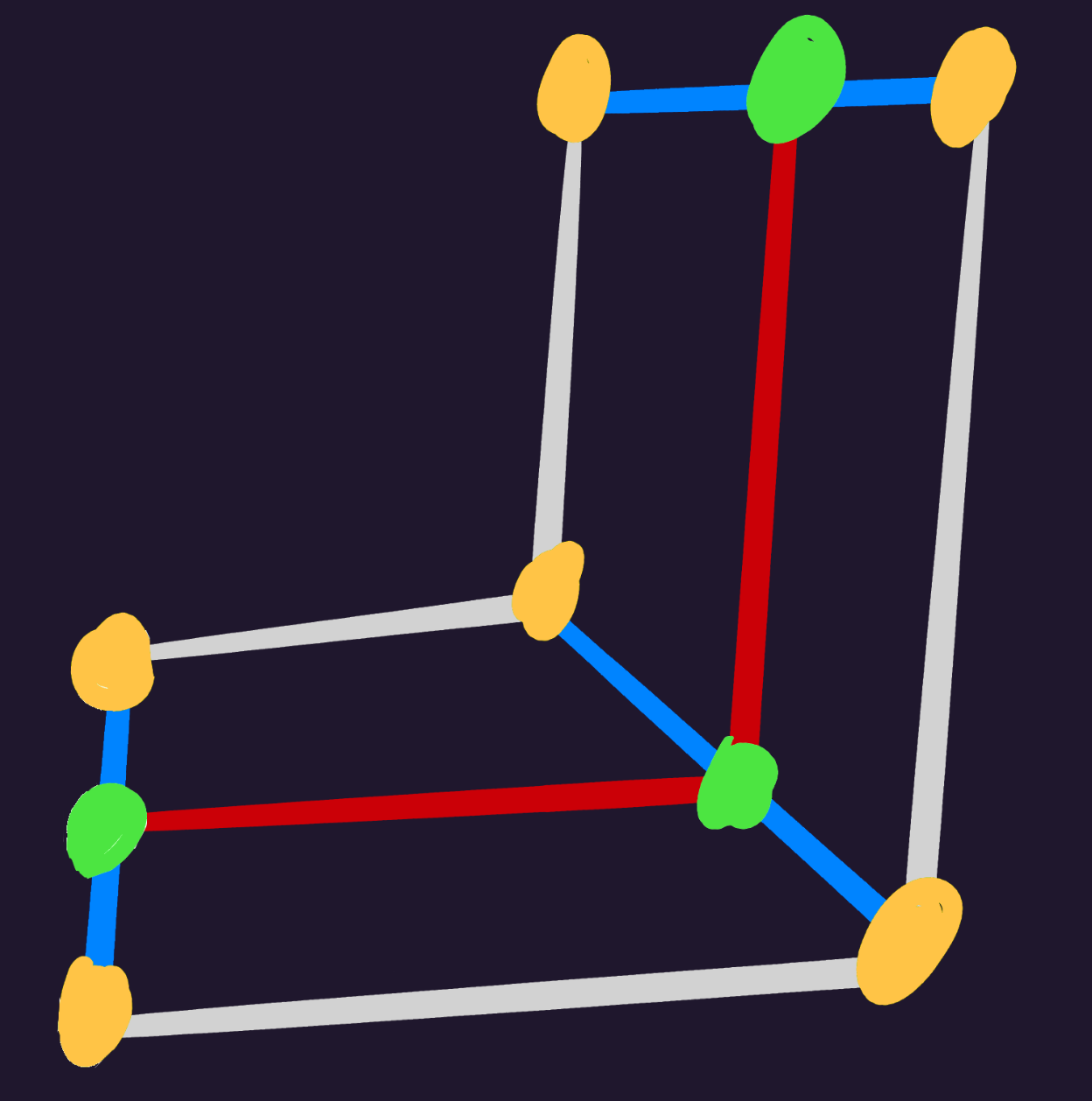
- Green - bind bone
- Orange - vertices
- Red - imaginary line from bind to bind
- Blue - Normal surface of imaginary line
Vertices will follow the path, distancing from the bind based on its surface angle and initial position from vertex to bind.
The following steps can be iterated per bind:
1. Get Adjacent Binds
To form the imaginary line, get the adjacent binds just before and just after the current bind. In particular:
- If current bind is first: get only next bind
- If current bind is last: get only previous bind
- If current bind is neither: get both previous and next bind
2. Get Average Normal Angle
Notice that in the diagram, the middle bind’s surface is at a 45° angle.
To do so:
- Get line from previous to current bind
- Get line from current to next bind
- Add up both lines
- Get angle of combined line
3. Rotate Vertices
- Reset vertex position to its initial position + bind position
- Rotate vertex around bind with angle from 2nd step
GetBoneTexture()
Helper function to provide the final Texture that a bone will use, based on
the provided tex name and styles.
GetBoneTexture(boneTex: string, styles: Style[]): Texture {
    for style in styles {
        tex: Texture = style.textures.find(|tex| tex.name == bone.tex)
        if(tex != None) {
            return tex
        }
    }
    return undefined
}
FormatFrame()
Provides the appropriate frame based on the animation, along with looping and reverse options.
function FormatFrame(
    frame: int,
    animation: Animation,
    reverse: bool,
    isLoop: bool
): int {
    lastFrame: int = animation.keyframes.last().frame

    if(isLoop) {
        frame %= lastFrame + 1
    }

    if(reverse) {
        frame = lastFrame - frame
    }

    return frame
}
TimeFrame()
Provides the appropriate frame based on time given (as duration).
The implementation of time is highly dependent on the language and
environment, but any conventional method should do.
If better suited, this function can be re-implemented for engine runtimes.
function TimeFrame(
    time: Time,
    animation: Animation,
    reverse: bool,
    isLoop: bool
): int {
    elapsed: float = time.asMillis() / 1e3
    frametime: float = 1.0 / animation.fps

    frame: int = (elapsed / frametime)
    frame = FormatFrame(frame, animation, reverse, isLoop)

    return frame
}
CheckBoneFlip()
Flips the bone’s rotation if either of the provided scale axes is negative (but not both).
This is the standard method of ‘flipping’ sprites, hence it uses an arbitrary scale rather than the bone’s own.
function CheckBoneFlip(bone: Bone, scale: Vec2) {
    bool both = scale.x < 0. && scale.y < 0.
    bool either = scale.x < 0. || scale.y < 0.
    if(either && !both) {
        bone.rot = -bone.rot
    }
}
Engine Runtimes
Engine runtimes handle specific environments such as loading and drawing, and must have a friendly user-facing API.
These runtimes may depend on a generic one to do the heavy lifting, leaving it to handle features that are best dealt with the engine (eg; rendering).
Example: The Macroquad runtime depends on a generic Rust runtime, and takes care of drawing the bones with Macroquad after animation logic has processed.
Load() - Engine
Reads a SkelForm file (.skf) and loads its armature and textures.
The below example assumes Texture2D is the engine-specific texture object.
function Load(zipPath: string): (Armature, Texture2D[]) {
    zip: Zip = ZipLib.open(zipPath)
    armatureJson: string = zip.byName("armature.json")

    armature: Armature = Json.new(&armatureJson)

    textures: Texture2D[]
    for(let atlas of armature.atlases) {
        Image img = zip.byName(atlas.filename)
        textures.push(Texture2D(img))
    }

    return (armature, textures)
}
Animate() - Engine
Simply calls Animate() from the generic runtime.
function animate(bones: Bone[], animations: Animation[], frames: int[], smoothFrames: int[]) {
    GenericRuntime.animate(bones, animations, frames, smoothFrames)
}
Construct() - Engine
Calls Construct() from the generic runtime, then modifies constructed bones
based on user options and engine quirks.
ConstructOptions {
    position: Vec2,
    scale: Vec2,
    velocity: Vec2,
}

function Construct(armature: Armature*, options: ConstructOptions): Bone[] {
    // this will modify armature.constructed_bones, as well as armature.bones for physics fields
    GenericRuntime::Construct(armature)

    for(let b = 0; b < armature.bones.length; b++) {
        let constructed_bone = &armature.constructed_bones[b];

        // engine quirks like negative Y or reversed rotations can be applied here
        constructed_bone.pos.y = -constructed_bone.pos.y
        constructed_bone.rot   = -constructed_bone.rot

        // apply user options
        constructed_bone.scale *= options.scale
        constructed_bone.pos   *= options.scale
        constructed_bone.pos   += options.position

        // bones must be flipped if scale is in the negatives
        GenericRuntime.CheckBoneFlip(bone, options.scale)

        // velocity only affects position for physics
        armature.bones[b].phys_global_pos -= options.velocity

        // engine quirks & user options applied to vertices
        for(let vert of constructed_bone.vertices) {
            vert.pos.y = -vert.pos.y
            vert.pos   *= options.scale
            vert.pos   += options.position
        }
    }
}
Draw()
Uses the bones from Construct() (usually armature.constructed_bones) to draw
the armature.
Propagated visibility is handled via a fixed bool array.
function Draw(bones: Bone[], atlases: Texture2D[], styles: Style[]) {
    // bones with higher zindex should render first
    sort(&bones, zindex)

    // initialize a fixed array of false, for propagated visibility
    let hiddens = new Array(bones.length).fill(false);

    for(let bone of bones) {
        let hidden = bone.hidden || false

        // if this bone's parent is hidden, so is this
        if (bone.parent_id != -1 && hiddens[bone.parent_id]) {
          hidden = true;
        }

        // add this bone's visibility to the array
        hiddens[b] = hidden

        if (hidden) {
          continue;
        }

        let tex = GenericRuntime.getBoneTexture(bone.tex, styles)
        if !tex {
            continue
        }

        // use tex.atlasIdx to get the atlas that this texture is in
        atlas = atlases[tex.atlasIdx]

        // crop the atlas to the texture
        // here, clip() is assumed to be a texture clipper that takes:
        // (image, top_left, bottom_right)
        // do what is best for the engine
        let realTex = clip(atlas, tex.offset, tex.size)

        // render bone as mesh
        if(bone.vertices.len() > 0) {
            drawMesh(bone, tex, realTex)
            continue
        }

        // A lot of game engines have a non-center sprite origin.
        // In this case, the origin is top-left of the sprite.
        // SkelForm uses center origin, so it must be adjusted like so.
        pushCenter: Vec2 = tex.size / 2. * bone.scale

        // render bone as regular rect
        drawTexture(realTex, bone.pos - pushCenter)
    }
}
FormatFrame()
Simply calls FormatFrame() from the generic runtime.
function FormatFrame(
    frame: int,
    animation: Animation,
    reverse: bool,
    isLoop: bool,
) {
    GenericRuntime.FormatFrame(frame, animation, reverse, isLoop);
}
TimeFrame()
Either calls TimeFrame() from the generic runtime, or is re-implemented to
better fit the engine/environment that the runtime is made for.
function TimeFrame(
    time: Time,
    animation: Animation,
    reverse: bool,
    isLoop: bool,
) {
    GenericRuntime.TimeFrame(time, animation, reverse, isLoop);

    // or, copy it's implementation with a more appropriate Time type from the engine
}